Monday, October 13, 2008

Asus Eee PC - Eeempressive!

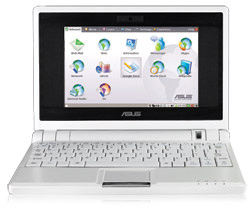
Do the words ultra-light, ultra-compact, ultra-thin when used for laptops send your wallet scurrying for cover? Sweat no more, Asus came up with the perfect solution for you. Its small, its light and it just works. It's called the Eee PC!

When Asus announced the Eee PC in 2007, people were highly skeptical of its performance and quality considering the low price tag. "Easy to learn, Easy to work, Easy to play" but didn't seem to be easy to pull off. The first Eee PC 4G was released on October 16, 2007. Needless to say it was a major success and sold 300,000 units by the end of the year.

So what was it that made this laptop, if we can call it that, such a huge success? Let's take a closer look. It sports a 7 inch WXGA (800 x 480) screen flanked by stereo speakers on either side and a VGA webcam on the top. Its actual dimensions are 225 × 165 × 21-35 mm and it weighs a shade over 2 lbs. Add to it the usual gamut of onboard audio ports, standard VGA out connector, Ethernet Jack, 3 USB 2.0 ports, one MMC/SD Card holder, built in Wi-Fi and a Kensington Lock slot, one PCI-e mini slot and that's pretty much everything crammed in to the package. There is a microphone too that sits, surprisingly, on the underside.

On the inside it is powered by a 900 Mhz Celeron UMV Processor, already under clocked to 630 Mhz by Asus, whose focus is more on lowering power consumption than number crunching to try and get as much battery life out of its 4 cell Li-Ion battery. Depending up on the usage it can last anywhere from 2 to 3.5 hours. A 910 chipset based motherboard keeps things tidy with all the onboard devices. Memory ranges from 512 MB to 1 GB depending upon the model, which is more than enough to run Xandros, the linux distro shipped with it or Windows XP which will soon be available as an option. But here comes the best part, its shipped with SSD instead of HDD. The result: Lower power consumption, faster performance, and more durability and so on. On the flip side it means they are able to ship it with only 2 GB, 4 GB and 8GB models. And thanks to the preinstalled programs the actual user usable storage space is limited to 400 MB, 1.6 GB and 5.1 GB respectively. Well to wipe that look of disappointment off your face, the SD slot supports SDHC so you can chuck in a 32 GB card in there to take care of your storage needs.

It comes with 40 preinstalled applications including Flash games, Firefox, Open Office, SMPlayer and Skype to take care of most of your productivity and entertainment needs. Ok, so you cannot play Crysis on it, but you can do the basic things like create and use documents, surf the net, chat, play movies and music and so on. It's not a desktop replacement, it's for those who need a laptop but cannot afford one or do not want to lug around a 5-6 pound notebook. It's meant for young kids, senior citizens, students. It's meant for writers like me who would love to be able to travel around with my office restricted to a notepad sized device that weighs less than the Physics book in my college! Asus plans to sell few millions of these this year and with the next generation 9 inch model just announced I don't see anyone stopping them from doing it.

This article is written by Jason Campbell who runs eDealsDepot - one of the most successful coupon websites on the internet for handpicked deals.

Article Source: http://EzineArticles.com/?expert=John_P_Campbell

Asus Eee PC on Amazon

Sunday, October 12, 2008

Ultra-Compact ASUS Eee PC 4G - It's Not Just for Students

The Eee Pc 4G is not just for kids and students it is equipped with a powerful selection of software to maximize personal productivity for professionals as well. The ASUS Eee PC 4G has the power of a full-sized laptop yet it is packaged in a ultra-compact case, Your Eee will come with a complete QWERTY keyboard, the preinstalled Linux operating system, is compatible with Microsoft Windows, as a built in Wi-Fi LAN (802.11b/g) wireless connection, (so you can connect to email and the Internet easily) and has a 7 inch screen. Since this unit uses flash memory (with 4 GB of storage) instead of a hard drive, the Eee PC is ideal for enduring rough handling and will still fit in those often over stuffed bags.

With a rapid start-up time, the Eee PC is always ready and able to get into the action.
The professional, will enjoy their Eee PC which comes with a powerful selection of software to maximize personal productivity (over 40 built-in applications). You will be using the Open Office suite of software that enables the user to open, edit and create documents, presentations, spreadsheets and databases all compatible with Microsoft Office. For professionals who use a computer out in the field to create, or to communicate and to pool resources with your colleagues, the Eee PC's combination of power, ultra portability and its' rugged build makes this a ideal solution for your computing needs out in the field.

While the Eee is a great choice for the professional it is also designed with the young students in mind, the Eee comes with a built-in Dictionary (great for homework), equipped with two modes of intuitive graphic user interfaces that are designed to accommodate both the experienced and inexperienced PC users. The Eee PC is also very capable of handling your digital images, movies, and music. It also has the capability for Internet radio.

No technical manual is required with the specially designed, and user-friendly graphic interface.
This highly compact and highly portable unit weighs in at just 32 ounces, the Eee PC 4G has a "*7-inch wide color TFT LCD with an 800 x 480-pixel resolution (WXGA). Under the hood is a 900 MHz Intel Mobile CPU with integrated Intel graphics processor, 512 MB of RAM (not expandable), and 4 GB of solid-state flash memory. With the dependable solid-state disk, you get unparalleled shock-protection and reliability.*" With the addition of its wireless LAN, you will also have access for a wired Fast Ethernet connection and a 56K modem. The Eee PC includes software needed for Web browsing and email, using (Firefox), The complete OpenOffice 2.0 for creating and editing word processing documents and spreadsheets, along with a suite of other productivity software to help you maximize your personal productivity keeping you up to speed and on track.

By: RR Smith
If you are looking for New, Used, or Refurbished laptops follow this link where you will have access to all makes and models with some tremendous saving available on your laptop Purchase you really need to check this out! Used Laptop Deals.Com at http://www.used-laptop-deals.com

Article Source: http://EzineArticles.com/?expert=Robert_R_Smith

More ASUS EEE PC ASUS Eee PC 4G on Amazon

Wednesday, October 8, 2008

What is Behind the Popularity of the Asus Eee PC 900?

The eagerly awaited Asus Eee PC 900 had become popular even before it came out. Thanks to the good track record of its predecessor the Asus Eee PC 701, many computer enthusiasts waited for the release of the latest addition to the "Easy to Learn, Easy to Work, Easy to Play" line of ultra mobile personal computers (UMPCs). But what gives it the edge over the other UMPCs out in the market?

Functional and Easy to Use

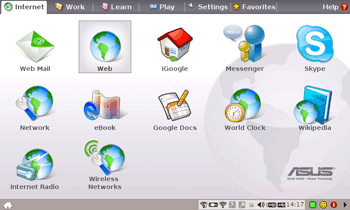
The Asus Eee PC 900 comes preinstalled with Linux Xandros, which presents you with a tabbed desktop. True to its slogan, the desktop tabs are labeled Learn, Work and Play, aside from Internet, Settings and Favorites.

The Internet tab gives you access to the preinstalled Mozilla Firefox for web browsing, Pidgin for instant messaging, and a Webmail button to access your webmail such as Gmail or Hotmail.

The Learn tab offers you educational programs to improve your vocabulary, spelling and arithmetic. There's also a periodic table and planetarium if you're science minded. The artist in you won't be disappointed either, since you'll have Paint to dabble with.

The Work tab makes OpenOffice accessible for all your word processing, spreadsheet and presentation needs.

The Play tab hosts the applications to help you unwind after a long day's work. The Asus Eee PC 900 comes with a media player, a music manager, a sound recorder and a number of games. Yes, you can play Solitaire to your solitary heart's delight!

The Settings tab houses the system utilities and configuration applications. Here's where you can change your computer's date and time, initiate virus scans and configure your touchpad settings.

Lastly, the Favorites tab is where you can save all your favorite links and shortcuts for easy access.

Portability is the Name of the UMPC Game

All these functions would just be dead weight if you had to lug around a supposed UMPC that weighs a ton. Thankfully, even with all these wondrous functions, the Asus Eee PC 900 weighs in at 990 grams. What's amazing is that you get 3 USB ports, a 1.3 Megapixel webcam, an SDHC card reader, an Ethernet port, and Wireless LAN connectivity in a laptop that weighs less than a kilogram. The only connection it doesn't have is Bluetooth. But you can't win them all. Perhaps a later addition to the Eee family will provide it.

The Price is Just Right

If you're still not convinced that the Asus Eee PC 900 with its functions and portability is enough for you, then the price just may win you over. Cnet Asia hailed its predecessor PC 701 as "possibly the cheapest laptop available to consumers". Admittedly the Asus Eee PC 900 has a more expensive price tag, but with a bigger screen (8.9" display), a bigger memory (1024 MB), and a bigger storage capacity (12 GB), Cnet Asia conceded that the Asus Eee PC 900 offers the best value in its class.

With the Asus Eee PC 900 being functional, easy to use and priced just right, it is hardly a surprise that it has become so popular?

Phil Fraser is the author of a number of technical ebooks and reports. You can read his review of the Asus 900 PC here:

http://www.asusreviewed.com

Article Source: http://EzineArticles.com/?expert=Phil_Fraser

Asus Eee PC 900 on Amazon

Sunday, October 5, 2008

Asus Eee PC 4G Surf Galaxy Black


Asus Eee PC 4G Surf (7" Screen, 800 MHz Intel Celeron Processor, 512 MB RAM, 4 GB Hard Drive, Linux Preloaded) Galaxy Black
From Asus


Customer Reviews

Cool pc5
It's lightweigth, it's really fast, good sound, good video playback, with little keyboard (maybe u will need an external one, i use one), long battery life. Really good option for mobile work.
The hard part is the hard disk format and installation of XP. I follow the guide, but i must enter to some web forums to find solutions. The first thing that i had to do was restore the linux installation and hard disk. after that the windows installation did finish (previously it shut down without finish it). After that all was rigth.
Enjoy it.

Great basic setup and super portability5
This little PC is super light easy to transport. The keyboard takes a little getting used to for touch typing, but once you get the hang of it it's not too bad.

The preloaded Linux OS comes with enough to perform all of the basic necessary tasks including browsing the web with feature rich content including Flash animation. It also has all of the standard Linux utilities to enable whatever level of customization that is desired within the hard disk size constraints. The default desktop is easy to navigate as well even for a computer novice.

The best ever5
OMG this is the best thing I've bought in a long time. I love it!

The wireless works great, I average about 650' (with non-metallic obstructions) from the wireless source with a decent connection. It picked up the nearby networks just fine and connected easily.

For the price this is definitely a great little PC for kids or even people that are really on the go and don't want the hassle of larger lap tops.

Product Details

  • Amazon Sales Rank: #93 in Personal Computers
  • Size: 7" screen
  • Color: Galaxy Black
  • Brand: Asus
  • Model: 90OA01A20102111U305Q
  • Dimensions: .79" h x 8.86" w x 6.30" l, 4.00 pounds
  • CPU: Intel Celeron 800 MHz
  • Memory: 512MB DDR2 SDRAM
  • Hard Disk: 4GB
  • Processors: 1
  • Display size: 7

Features

  • Dimensions WxDxH - 8.86" x 6.30" x 0.79" ~ 1.26"
  • Weight - 2.0 lbs
  • Processor - Intel Mobile CPU
  • Display Type -- 7" Wide
  • Display Resolution -- 800x480 (~WVGA)

Editorial Reviews

Amazon.com Product Description
Get the power of a full-sized laptop in the ultra-compact ASUS Eee PC 4G, which offers a full QWERTY keyboard, 7-inch screen, and preinstalled Linux operating system. (This laptop is also compatible with the Microsoft Windows XP operating system.) You'll be able to stay connected to email and the Internet easily thanks to the Wi-Fi LAN (802.11b/g). Because it uses flash memory instead of a hard drive (with 4 GB of storage), the Eee PC is optimal for weathering rough handling and sharing space in overstuffed bags.


With a rapid start-up time, the Eee PC is always ready to get into action.

For the professional, the Eee PC comes with a powerful selection of software to maximize personal productivity--over 40 built-in applications. The Open Office suite of software enables the user to open, edit and create documents, presentations, spreadsheets and databases that are compatible with Microsoft Office. For journalists, photographers and other professionals who need to use a computer in the field to create, to communicate and to collaborate with other colleagues, the Eee PC's combination of power, extreme portability and rugged build makes it the ideal computing solution.

It's also a great choice for young students, with a built-in Dictionary that's great for homework, and it includes two modes of intuitive graphic user interface design to accommodate both experienced and inexperienced PC users. The Eee PC also handles your digital images, movies, and music as well as Internet radio.


No technical manual required with the specially designed, user-friendly, and intuitive graphic interface.
Compact and highly portable at just 32 ounces, the Eee PC 4G has a 7-inch wide color TFT LCD with an 800 x 480-pixel resolution (WXGA). Under the hood is a 900 MHz Intel Mobile CPU with integrated Intel graphics processor, 512 MB of RAM (not expandable), and 4 GB of solid-state flash memory. With the dependable solid-state disk, you get unparalleled shock-protection and reliability. In addition to its wireless LAN, it also offers wired Fast Ethernet connectivity. The Eee PC includes software for Web browsing (Firefox), email, OpenOffice 2.0 for creating and editing word processing documents and spreadsheets, and a suite of other productivity software to help keep you on track.

You get three USB 2.0 ports, a VGA output for connecting to external monitors, headphone and microphone jacks, and a Secure Digital (SD) memory card slot. The Eee PC measures 8.9 x 6.5 x 1.4 inches, and it weighs 32 ounces. The 4-cell, 5200 mAh battery provides up to 3.5 hours of battery life (depending on usage). It's backed by a 1 year warranty for parts and labor.

More Asus EEE PC Notebook : Asus Eee PC Notebook Store

Friday, October 3, 2008

Why is the ASUS Eee Pc Good?

ASUS Eee pc was designed in 2007 by ASUS and Intel. The word "Eee" is an advertising slogan for this machine which stands for "the three Es" which means "Easy to learn, Easy to work, Easy to play". ASUS Eee PC is not a big Personal Computer but rather it is a subnotebook. Subnotebooks are small and lightweight portable computers with most of the features of a standard laptop, but smaller. The price of Asus Eee pc was listed around only $199 USD which is why many people were anxiously waiting for the launch date.

- How do I know which model is better?

Nowadays, ASUS uses EeePc 8G, 4G, 4G Surf and 2G Surf as the names for the various models available. That makes it easier for customers to understand what product they are looking for.

For example, if you were to visit a computer shop or shopping website you might see the name of product like below.

"Asus Eee PC 4G (73 Screen, 800 MHz Intel Celeron Processor, 512 MB RAM, 4 GB Hard Drive, Linux Preloaded)"

4G indicates that the size of Hard Drive is 4GB.

Linux Preloaded indicates that it uses Linux for the OS.

"Asus Eee PC 2G Surf (73 Screen, 800 MHz Intel Celeron Processor, 512 MB RAM, 2 GB Hard Drive, Linux Preloaded) Galaxy Black"

2G indicates that the size of Hard Drive is 2GB.

Linux Preloaded indicates that it uses Linux for the OS.

- Why is the ASUS Eee pc good?

Because of the price which is affordable, and the high quality software that is bundled with it. The price of the ASUS Eee pc costs less than half when compared with a laptop. That is why ASUS Eee pc is good.

- What does not come with the ASUS Eee PC?

The ASUS Eee PC does not come with a DVD/RW, but any external USB unit can be used. That helps this machine stay lightweight.

- What kind of work is it appropriate for?

The ASUS Eee PC is appropriate for everybody who is looking for an affordable laptop. Even for kids it can be the first step for them in learning. Being only 7 inches wide makes it great for portability.

- What programs are bundled?

As you know ASUS Eee pc use Linux for the OS, which makes this machine much faster than Window XP. Eee PC runs a custom tab-based interface and uses IceWM as the default window manager. They also included OpenOffice.org (except Draw), Mozilla Firefox, Skype, Tux Paint,, E-mail, a Wikipedia look-up tool, Google Doc,Internet radio applications, and many types of software for entertainment and education.

- Can I replace Linux with Window XP?

ASUS Eee pc comes shipped with Linux, but also with some very simple instructions for replacing Linux with Windows/XP if you have a licensed copy Windows available to install. However, ASUS announced on October 16, 2007 that a future version of the Eee will be sold with Windows XP. Microsoft agreed to lower the price of Windows for Eee PC users to under US$40. We are waiting that day, aren't we?

- Are there any disadvantages?

Yes, there are. The screen is a 800×480 resolution, an odd size. It can be set to 800×600, but that requires some auto-scrolling to get to the top and bottom of the screen. All in all the 800×480 resolution isn't bad, though. There are also no Caps Lock, Num Lock, or Scroll Lock indicators. However there is an excellent freeware utility available on the Web that places indicator lights in the system tray, which may take some time getting used to.

I work as a freelance programmer in Thailand, but in leisure time I'm a newbie writer who really love to learn about new technology. You can find more articles at http://www.biggersale.com

Article Source: http://EzineArticles.com/?expert=Nattapol_Ngamarunsuk

More Asus EEE PC Reveiws : Asus Eee PC Reviews